Ask a team what slows their workday down and you will hear the same answers: calls that drop, meeting rooms that take ten minutes to connect, and three different apps doing the job of one. Communication systems are supposed to disappear into the background. When they are designed well, they do. When they are bolted together over years, they become the most complained-about part of the office.
This article looks at how the pieces fit together, voice, video, and audio, and what changes when they are planned as one system rather than bought as separate products.
Voice That Works From Anywhere
VoIP has been the sensible default for years, yet many businesses still run on legacy PBX hardware that ties phone numbers to a physical room. A modern cloud or hybrid PBX changes the model. Extensions follow people across desk phones, laptops, and mobiles. A branch in Abu Dhabi and a branch in Riyadh share one dial plan. Call recording, queues, and reporting come built in rather than bolted on.
The catch is that VoIP is only as good as the network under it. Voice traffic needs priority through QoS policy, clean Wi-Fi for cordless handsets, and enough bandwidth headroom for busy hours. This is why we treat telephony as a network project first and a phone project second.
Number porting is the other detail that trips projects up in this region. Moving existing numbers to a new provider takes planning and paperwork, and the timeline is not always in your control. Start that process early, run old and new systems in parallel during the cutover, and your customers never notice the change.
Meeting Rooms That Start on Time
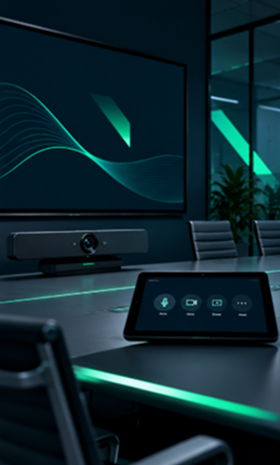
The average meeting loses its first several minutes to cables, adapters, and someone calling IT. Multiply that by eight rooms and a full calendar, and a mid-size office quietly loses hours every week. Well-designed rooms fix this with boring reliability: one touch panel to start everything, a conferencing bar certified for the platform the company actually uses, and a display sized for the room rather than the catalog.
Consistency matters more than features. When every room works the same way, staff stop thinking about the room at all. Standardizing on one room kit across 12 meeting spaces, as we did for a Cairo professional services firm, cut their meeting-related support tickets by more than two thirds in one quarter.
Adoption is the final piece. The smartest room fails if nobody trusts it. A short walkthrough for each team, a printed quick-start card on the table, and one obvious place to report problems will do more for usage than any feature list. Technology that people avoid is money spent on decoration.
The best communication system is the one nobody thinks about. It just works, every time, in every room.
Audio and Video Beyond the Meeting Room
Communication infrastructure extends well past the boardroom. Warehouses need paging that reaches the far aisle over machinery noise. Retail floors need background audio with zone control. Reception areas and showrooms need displays that marketing can update without filing a ticket. Each of these runs on the same structured cabling and network backbone as everything else, which is exactly why they should be planned together.
Designed as a system, a few principles carry the load:
- Every endpoint, phone, camera, speaker, display, lands on the structured cabling plan from day one.
- Voice and video traffic get QoS priority, so calls stay clear when the network is busy.
- Rooms and zones follow one control standard, so any trained staff member can run any space.
- Everything is documented and supported under one agreement, with one number to call.
Bring the Systems Together
The real efficiency gain is not in any single device. It is in integration and accountability. When voice, video, paging, and displays are designed together, they share infrastructure, share management tools, and share a support path. When they are bought separately, every fault becomes an argument between vendors about whose box is at fault.
For operations and IT leaders, the practical advice is simple. Plan communication systems at fit-out or renovation time, alongside the network, not after. Insist on one design covering all of it. And ask whoever builds it who answers the phone when something stops working. If the answer is more than one company, keep looking. Our audio and video team designs these environments end to end, and stays accountable after handover.